
AI SEO for WordPress: Fix HTML, Not Shadow Pages
AI SEO for WordPress: Fix HTML, Not Shadow Pages
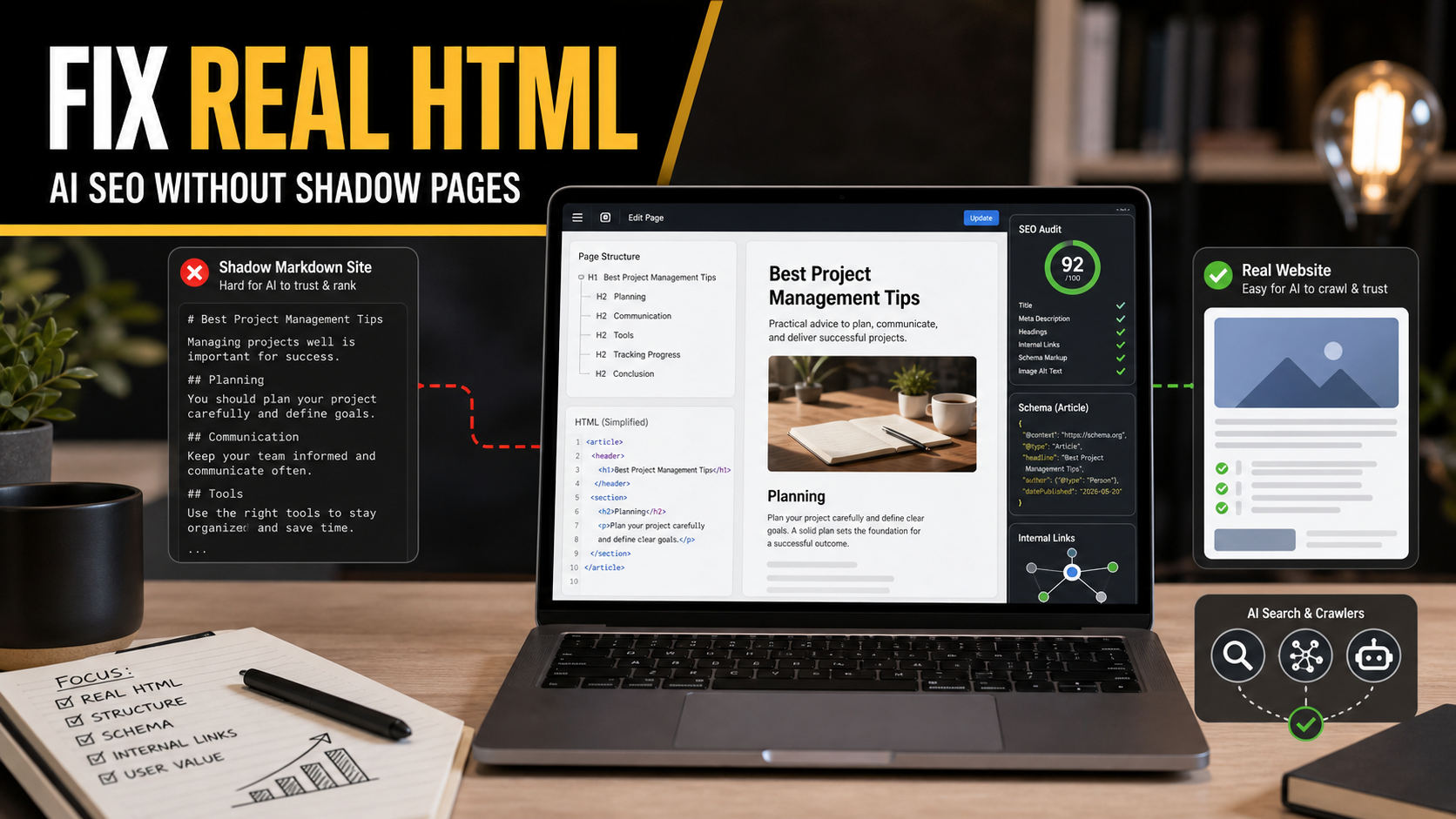
Short answer: WordPress site owners should not build a separate Markdown or “AI-only” version of their website just because AI search is growing. The safer 2026 strategy is to make the real HTML page easier for humans, search engines, and AI answer systems to understand: clean templates, clear headings, useful images, structured data where appropriate, strong internal links, and content that adds real experience.
This matters because the latest SEO discussion is moving from “Should I add an llms.txt file?” to a bigger question: should a website maintain a parallel machine-readable version of every page for AI systems? Search Engine Journal reported on June 23, 2026 that Google’s John Mueller and Martin Splitt cautioned against using separate Markdown versions as an AI SEO shortcut. I would treat that as a practical warning, not as a reason to ignore AI search. If the HTML page is messy enough that you feel tempted to create a second “clean” version for bots, the better fix is usually to clean the real page.
As a freelance web developer with 10 years of experience, this is the part I would emphasize to clients: AI SEO should not create another fragile publishing system. It should make the main website clearer, faster, more maintainable, and easier to quote accurately. A shadow version may look neat during a demo, but it can quietly drift away from the page customers actually see.
What Changed In The AI SEO Conversation
SEJ’s article summarized a Search Off the Record discussion where Google representatives warned that Markdown-only or parallel machine-facing versions can create duplicate maintenance work and debugging problems. The concern is not that Markdown is evil. Markdown is excellent for documentation, readme files, internal notes, and many developer workflows. The problem appears when a business publishes one version for people and another version for AI systems, then expects both to stay accurate forever.
That warning fits Google’s official guidance on generative AI search. In the Google Search Central guide to generative AI features, Google says AI Overviews and AI Mode are rooted in Search systems, including indexed pages, ranking, retrieval, and grounding. The guide repeatedly points back to useful content, clear organization, crawlable pages, good technical structure, and strong page experience. In other words, AI search does not remove the need for a good website. It makes the quality of the real website more important.
The same pattern is visible in Google’s documentation on dynamic rendering. Google describes dynamic rendering as a workaround, not a preferred long-term architecture, because serving separate versions to users and crawlers can be hard to maintain. A Markdown shadow site for AI search carries a similar operational risk: two versions, two QA paths, two failure modes, and one site owner who probably only checks the public page.
Definition: What Is A Markdown Shadow Page?
A Markdown shadow page is a simplified text-first version of a normal web page, often created for AI crawlers, LLM tools, or internal automation. It may live at a separate URL, in a hidden directory, in an alternate feed, or in a generated file that mirrors the public page.
For example, a WordPress service page might exist at:
/wordpress-maintenance/for visitors/ai/wordpress-maintenance.mdfor AI tools/llms/wordpress-maintenance.mdas an alternate machine-readable copy
That sounds tidy at first. The AI tool gets a clean version without popups, sliders, cookie banners, broken page builder wrappers, or bloated markup. But the real issue is hiding underneath: if your main WordPress page needs a separate clean copy to be understandable, your content model, theme, or page builder structure probably needs work.
Why This Matters For WordPress Sites
WordPress makes publishing easy, but it also makes accidental complexity easy. A small business site can end up with a page builder, SEO plugin, schema plugin, cookie banner, tracking scripts, popup plugin, animation library, lazy loading plugin, cache plugin, and custom theme overrides all touching the final HTML. The public page may look acceptable, but the source can become noisy and inconsistent.
When AI search becomes a concern, the tempting response is: “Let’s give AI a clean Markdown copy.” I understand the instinct. I have opened enough inherited WordPress sites to know how unpleasant the markup can become. But a separate AI copy does not fix the customer experience, does not fix internal linking, does not fix accessibility, does not fix conversion paths, and does not make the main page easier for Google to render and index.
This connects directly with my earlier guide on LLMs.txt for WordPress SEO. A short /llms.txt file can be a useful map, but it should not become a substitute website. It should point to the best canonical resources, not create a second content universe.
Quick Comparison: Real HTML Fixes Vs AI Shadow Pages
| Decision | When It Helps | Main Risk | My Recommendation |
|---|---|---|---|
| Improve the existing HTML page | The page has weak headings, noisy layout, poor internal links, or missing context | Takes more real development effort | Best long-term fix for users, Google Search, and AI answer systems |
Add a short /llms.txt file |
The site already has strong pages and needs a curated AI-readable map | Can become stale if no one owns it | Useful support file, not a ranking shortcut |
| Create Markdown copies of every page | Rarely; maybe for documentation exports or developer handoffs | Duplicate maintenance, stale content, debugging blind spots | Avoid for normal business WordPress SEO |
| Use dynamic rendering or bot-specific output | Emergency workaround for complex JavaScript rendering issues | Two versions can drift and create hidden indexing problems | Use only with a clear reason and monitoring plan |
| Rewrite the content model and templates | The site has repeated layout/content problems across many pages | Requires planning and testing | Best option when the same SEO issue appears everywhere |
The Better AI SEO Goal: One Page That Everyone Can Understand
A strong WordPress page should not need a secret translation layer. It should answer the visitor’s question clearly, show relevant proof, link to related resources, and expose a sensible document structure. That helps human readers. It also helps crawlers, screen readers, AI retrieval systems, and future assistants that summarize pages.
What AI Systems Need From A Page
AI answer systems are not magic. They need extractable facts, clear relationships, and enough context to avoid guessing. A page about WordPress maintenance, for example, should make it easy to identify what the service includes, who it is for, what problems it solves, how often tasks are performed, what exclusions exist, and how someone can request help.
That does not require raw Markdown. It requires disciplined web publishing:
- One clear page purpose
- A title and intro that match the user’s search intent
- Logical H2 and H3 sections
- Descriptive internal links
- Images that support the topic, not decorative clutter
- FAQ content when real questions exist
- Schema only when it accurately represents visible content
- Fast enough performance that the page can be rendered and used
If you are working on AI search visibility more broadly, my Google AI Search SEO for WordPress guide is the better starting point. It covers the wider technical and content work that should come before optional AI-facing files.
How To Audit A WordPress Page Before Creating Any AI Version
Before you create a Markdown copy, run this practical audit. This is close to the checklist I use when a client asks why a page is not ranking, converting, or being summarized correctly.
Step 1: Check The Rendered Page, Not Just The Editor
Open the live page in a browser and read it like a customer. Can you understand the offer in 10 seconds? Is the first visible screen specific, or does it use vague copy like “innovative digital solutions”? Is the call to action visible without covering the content?
Then inspect the rendered HTML. You do not need to obsess over every wrapper, but check whether the actual content appears in the HTML, whether headings are in a sensible order, and whether important text is not trapped inside images, sliders, canvas elements, or scripts.
Step 2: Review The Heading Structure
WordPress themes and page builders often create heading problems. A decorative section title becomes an H2, a testimonial name becomes an H3, and a pricing widget injects headings that do not match the article structure. AI tools may still parse the page, but unclear headings make the page harder to summarize accurately.
Use the page title as the H1 and keep the body sections below it. Since WordPress already renders the post title as H1, the body content should start with a paragraph or H2. For service pages, a simple pattern works well: problem, service explanation, process, pricing or quote expectations, proof, FAQ, and next step.
Step 3: Remove Content Hidden From Users
If the page contains hidden blocks, old tabs, abandoned accordion copy, unused schema text, duplicate mobile-only sections, or page builder leftovers, clean them up. Hidden content can confuse audits and create a gap between what users see and what crawlers process.
This is also where I check whether a site has old shortcodes from removed plugins. If a page still shows broken shortcode text or invisible plugin output, do not build an AI copy. Fix the page.
Step 4: Strengthen Internal Links
Internal links are context. They show which pages belong together and help readers continue the journey. For a WordPress development site, a post about AI SEO should naturally connect to related topics such as Google AI Mode and website owner preparation, practical SEO cleanup, and website maintenance.
The anchor text should describe the destination. Avoid generic “click here” links. A good internal link says what the reader will learn next, which is useful for humans and easier for automated systems to interpret.
Step 5: Validate The Canonical Page
If you have multiple versions of a page, canonical signals become important. A Markdown copy, PDF copy, print view, AMP-like variant, or translated version can accidentally compete with the main URL. Check canonical tags, sitemap entries, noindex rules, redirects, and robots.txt. The canonical page should be the best public version of the content.
For most business WordPress sites, the canonical page should be the normal HTML URL. If you publish a supporting text file, make it clearly supporting material, not a replacement for the main page.
Step 6: Add Structured Data Only Where It Matches The Page
Schema can help search engines understand page entities and relationships, but it is not a place to stuff hidden claims. Add Article, FAQPage, LocalBusiness, Service, Product, BreadcrumbList, or Organization schema only when it accurately reflects visible content and the page type.
For blog posts, Yoast SEO usually handles a sensible baseline. For custom service pages, I often check whether the theme and SEO plugin are producing clean schema without conflicts. Multiple plugins can output overlapping Organization, WebPage, or FAQ markup, which makes the page less tidy than the client expects.
WordPress Troubleshooting Table
| Symptom | Likely WordPress Cause | Fix Before Any AI Copy |
|---|---|---|
| AI tools summarize the wrong service | Generic intro, weak headings, or multiple unrelated offers on one page | Rewrite the page around one search intent and separate unrelated services |
| Google indexes thin archive pages instead of strong posts | Tag/category archives are indexable without unique value | Noindex weak archives or improve archive templates with helpful context |
| The page looks fine but source HTML is chaotic | Page builder wrappers, old shortcodes, plugin leftovers, or nested blocks | Simplify the layout and rebuild reusable sections cleanly |
| Important details are missing from summaries | Details are inside images, sliders, tabs, or scripts | Put key facts in visible HTML text with supporting media |
| Multiple versions of the same page appear | Print pages, staging URLs, duplicate slugs, parameters, or generated exports | Set canonicals, redirect duplicates, and remove accidental public copies |
| FAQ schema exists but no FAQ appears to users | SEO plugin or custom field outputs hidden structured data | Make FAQ content visible or remove the schema |
When A Markdown File Still Makes Sense
I am not against Markdown. I use it constantly. The point is to avoid using it as a workaround for a neglected public website.
Markdown can still be useful in these cases:
- Developer documentation for a plugin, theme, or API
- Internal content briefs before publishing in WordPress
- Readme files for GitHub repositories
- A curated
/llms.txtfile that points to canonical pages - Exportable support docs that are also published as proper HTML pages
- Automation workflows where Markdown is the draft format, not the final public experience
The line I would not cross for most client sites is maintaining a complete second version of the website just for AI crawlers. That adds maintenance cost without fixing the main customer-facing asset.
Ricky’s Practical WordPress Workflow
If a client asked me to make their WordPress site more AI-search friendly this week, I would follow this order:
- Pick one important page. Start with a service page, cornerstone blog post, or high-conversion landing page.
- Confirm the search intent. Decide what question the page should answer and who the answer is for.
- Clean the real page structure. Fix headings, intro copy, buried details, duplicate sections, and broken shortcodes.
- Improve the visible answer. Add concise definitions, examples, steps, comparison tables, pricing context, or FAQs where useful.
- Add internal links. Connect the page to related service pages, troubleshooting posts, and supporting guides.
- Check technical basics. Review indexability, canonical tags, sitemap inclusion, schema, mobile rendering, and Core Web Vitals issues.
- Only then consider AI support files. Add
/llms.txtor documentation exports only if they support a real maintenance workflow.
This workflow is slower than generating Markdown copies, but it produces a site that works better for everyone. It also gives a freelancer something defensible to show the client: before-and-after headings, better snippets, clearer internal links, fewer template problems, and a cleaner maintenance plan.
Common Mistakes To Avoid
- Mistake 1: Treating AI SEO as a separate website. AI visibility should come from the same content and technical quality that helps real visitors.
- Mistake 2: Publishing Markdown copies without ownership. If no one owns updates, the files will become stale.
- Mistake 3: Hiding the best answer from the public page. If the clean explanation only exists in the AI copy, users lose.
- Mistake 4: Forgetting conversion paths. A machine-readable page does not help if the real page has weak calls to action, unclear service details, or broken forms.
- Mistake 5: Using schema as a hidden content layer. Structured data should describe visible content, not replace it.
- Mistake 6: Creating more URLs than you can monitor. Every alternate version needs QA, canonical decisions, and a maintenance owner.
Expert Note: The Real Problem Is Usually Content Operations
When a WordPress site becomes hard for AI systems to parse, the root cause is usually not “AI needs Markdown.” The root cause is content operations: too many plugins touching output, no template standards, no internal linking process, no owner for old pages, and no QA checklist after redesigns.
That is why I like practical maintenance work. A good maintenance routine catches the issues that create AI SEO panic later: broken layouts, old plugin output, duplicate pages, missing alt text, outdated service descriptions, and index bloat. If your site has been patched, redesigned, and extended for years, a clean-up sprint will usually beat a new AI-only publishing layer.
For broader website maintenance context, Ricky’s guide on common WordPress launch problems is a useful companion. Many of the same issues that hurt launches also hurt AI readability: unclear content, plugin conflicts, redirects, forms, performance, and missing QA.
FAQ
Should I create Markdown versions of my WordPress pages for AI SEO?
Usually no. For a normal business WordPress site, improving the real HTML page is safer and more useful than maintaining a second Markdown version. Use Markdown for drafts, documentation, or support files, not as a parallel public website.
Is this the same as llms.txt?
No. A concise /llms.txt file can act as a curated map to important pages. A Markdown shadow site tries to duplicate full page content somewhere else. The first can be lightweight; the second can become a maintenance burden.
Will Google reward a cleaner AI-only version?
Do not assume that. Google’s official AI search guidance points back to indexed, helpful, well-structured pages in the normal Search ecosystem. The safer bet is making the canonical page better.
What if my WordPress theme creates terrible HTML?
Fix the theme or rebuild the affected templates. Review heading order, visible content, schema output, mobile rendering, and page builder bloat. If the same issue appears across many pages, solve it at the template level instead of page by page.
Can AI tools still read normal HTML?
Yes. HTML has decades of support across browsers, search systems, accessibility tools, parsers, and automation workflows. The issue is not HTML itself; the issue is poorly structured pages.
What should freelancers sell instead of AI shadow pages?
Sell an AI-readiness and SEO cleanup sprint: content structure, technical SEO, internal links, schema validation, template cleanup, index control, and a simple maintenance checklist. That work has value even if AI search behavior changes again.
Final Recommendation
If your WordPress site feels too messy for AI systems, do not hide the problem behind Markdown copies. Fix the canonical pages. Make the live HTML clear, useful, structured, and easy to maintain. Add a small /llms.txt file only when it supports that main website, not when it distracts from it.
AI search is changing how people discover answers, but the web still rewards pages that communicate well. For WordPress owners, the best AI SEO investment is not a shadow site. It is a cleaner real site.
Sources
- Search Engine Journal: Google cautions against Markdown versions of websites for AI SEO
- Google Search Central: Optimizing your website for generative AI features on Google Search
- Google Search Central: Dynamic rendering as a workaround
- Google Search Central: Creating helpful, reliable, people-first content
- WordPress Developer Resources: Template hierarchy